10bii Financial Calculator
- 4.4
- Rating
- 50.00K
- Installs
- $5.99
- Price

 Analysis by App-foxy
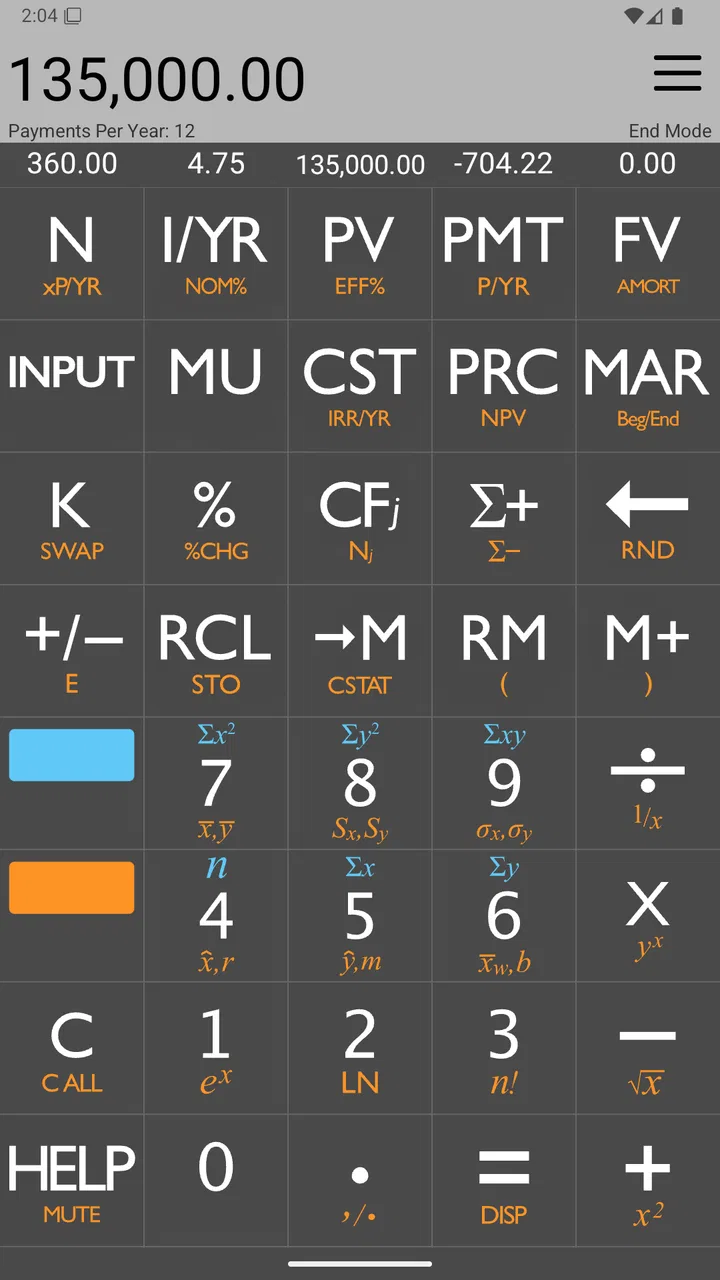
I approached 10bii Financial Calculator as a practical tool rather than a novelty calculator. It belongs in the finance category, costs $5.99, and is built by In A Day Development. The basic idea is familiar to anyone who has used a business or financial calculator: enter values, choose a financial operation, and let the app handle the calculation. What makes it interesting is its attempt to offer the feel of an HP 10bII while being easier to approach.
That distinction matters. A normal phone calculator is fine for splitting a bill or checking a percentage, but it becomes awkward when you are working through interest, payments, cash flows, or time-value-of-money problems. This app is aimed at the point where a simple calculator stops being enough, without forcing every user to carry a dedicated financial calculator. After spending time with it, I see it as a focused instrument for students, property buyers, small-business owners, and anyone who occasionally needs repeatable financial calculations.
How it feels in everyday financial work
The first thing I noticed is that this is not designed around the casual calculator habits most people bring to a phone. Its value comes from a more deliberate workflow. Instead of treating each calculation as an isolated equation, I can think in terms of financial variables: an amount today, a future amount, a rate, a number of periods, or a payment. That approach is more useful for planning, but it also means the app rewards a little preparation.
You May Also Like

 AccuWeather: Weather Radar
AccuWeather Review: A Quick, Clear Forecast for Everyday Decisions
For everyday plans, the best forecast is the one you can understand quickly. AccuWeather makes rain timing, radar, and local conditions easy to act on, with a few trade-offs.

 Hill Climb Racing
Why Hill Climb Racing Still Turns Crashes Into One More Run
A tiny car, a bumpy hill and one more upgrade: Hill Climb Racing keeps resurfacing because its simple chaos makes every near-miss feel personal.

 AliExpress - Shopping App
AliExpress Makes Global Shopping Feel Personal, but Shoppers Bear the Risk
AliExpress turns a global marketplace into a pocket-sized discovery engine. Its reach is useful, its shopping loop compelling, and its trade-offs easy to miss.

 Lords Mobile: Kingdom Wars
Lords Mobile Is a Kingdom-Building Routine, Not a Quick Match
A case-by-case verdict on the building, battles, device demands, and social commitments that make Lords Mobile rewarding for some players and exhausting for others.

 PDF Scanner app - TapScanner
TapScanner Makes Paperwork Easier to Capture, Check, and Share
TapScanner makes scanning with a phone feel less like a rescue operation and more like a dependable step in getting work done. Its capture tools are useful, though not flawless.

 Block Blast!
 Shows How Much a Puzzle Game Can Leave Out
A quiet grid game shows why puzzle players increasingly value instant clarity, repeatable skill and low-pressure play—and where the genre still needs to catch up.
More From Our News Desk
View All News


For example, when comparing a loan offer, I would not use it merely to multiply the advertised payment by the number of months. I would use it to examine the relationship between the borrowed amount, the interest rate, the payment, and the duration. That gives me a more useful answer than a standard calculator because it helps me test different scenarios. A slightly longer term may reduce the regular payment while increasing the overall cost, and a financial calculator is the right kind of tool for seeing that trade-off.
The HP 10bII influence is important here. People who already know that style of calculator will likely understand the general logic quickly, while newcomers may need time to learn which value belongs in which role. In my experience, the easier presentation helps, but it does not remove the need to understand the calculation itself. The app can make the arithmetic faster; it cannot decide whether your assumptions are sensible.
That is one of the most useful lessons for new users. Before entering anything, decide what the figures represent and keep the time unit consistent. A monthly payment, an annual rate, and a number of months should not be mixed casually. If I enter values without first defining the period, the result may look precise while answering the wrong question. The app is most dependable when I treat it as a structured financial instrument rather than a magic answer box.
Speed during normal use
For the kind of work this app is made for, perceived speed is less about dramatic animation or visual effects and more about how quickly I can move from one scenario to the next. Financial calculations are generally small operations, so I would expect the actual arithmetic to feel immediate on a compatible device. The more meaningful question is whether the interface lets me enter figures, revise assumptions, and repeat a calculation without unnecessary friction.
That is where a dedicated financial calculator has an advantage over searching for formulas online. I can keep the problem in one place and adjust a variable instead of rebuilding the calculation from scratch. If I am comparing several possible payment amounts, the time saved comes from the workflow, not from raw computing power. The app does not need to perform a complicated simulation to be useful; it needs to remain predictable while I test alternatives.
I also appreciate that its purpose is narrow. It is not trying to be a budgeting dashboard, a banking portal, or a general finance organizer. That focus should help it feel responsive during the tasks it targets, because the experience is centered on calculation rather than on loading account data or presenting a large collection of unrelated tools.
Still, speed depends on the user as much as the software. Someone familiar with financial-calculator notation will move quickly, while a first-time user may pause to check the meaning of each input. I would not judge that learning curve as a performance problem. It is the cost of using a more capable model than the ordinary calculator already on a phone.
What happens during heavy calculation sessions
The app becomes most valuable when I use it in a chain of related calculations. A realistic example would be reviewing a possible home purchase. I might begin with the amount financed, then test different rates, change the repayment period, and compare the resulting payment with my monthly budget. After that, I could examine what happens if I make a larger initial contribution. The important feature of this workflow is not one final number; it is the ability to explore the consequences of several assumptions.
This kind of session can expose a practical weakness in any financial calculator: input mistakes compound quickly. If I forget to replace one earlier value, the next result may still look reasonable. My best habit is to pause between scenarios and identify which variables are being changed. I also write down the assumptions beside the result when the decision matters. That makes the app more useful as a reasoning aid and reduces the risk of treating an unexplained figure as a recommendation.
Another good use is studying. A student can work through time-value-of-money exercises repeatedly, changing one value at a time to understand how the answer responds. That is more educational than copying a result from a website because the relationship between the inputs becomes visible. I would use it alongside course notes, however, since knowing the button sequence is not the same as understanding why a particular financial model applies.
For small-business work, I can imagine using it to compare financing options or estimate the effect of payment timing. It is particularly helpful when a spreadsheet feels excessive for a quick question. On the other hand, once the task involves many transactions, irregular cash flows, records that need to be shared, or a permanent audit trail, I would move to a spreadsheet or accounting application. A calculator is excellent for focused analysis but not a replacement for financial recordkeeping.
A useful advanced habit is to calculate in both directions when possible. If I know the amount financed and payment, I can estimate the implied rate or duration; if I know the rate and duration, I can examine the payment. Reversing the problem provides a basic sanity check. When two approaches do not align, I know to inspect the periods, signs, or entered values before trusting the result. This is the sort of discipline that makes a financial calculator safer in real decisions.
Stability and recovering from mistakes
Reliability in this category means more than avoiding a crash. I want the calculator to preserve a clear relationship between the values I entered and the answer it produced. A stable tool should let me correct a mistaken assumption without forcing me to abandon the whole scenario. That is especially important when I am working under pressure, such as checking a quote during a conversation or reviewing a financing example before a deadline.
I would approach recovery in two stages. First, I would correct the specific input that seems wrong and recalculate. Second, if the result still looks unusual, I would rebuild the scenario from the beginning rather than repeatedly editing an uncertain chain of values. This is not a criticism unique to this app; it is a sensible practice for any calculator that remembers values during a session. The more convenient the memory of prior inputs becomes, the more important it is to know what remains active.
There is also a difference between a wrong answer caused by a wrong formula and one caused by wrong assumptions. The app can perform the selected operation, but it cannot know whether I meant monthly or yearly periods, whether a cash flow should be positive or negative, or whether a rate has been converted correctly. My confidence in the result therefore depends on checking the setup, not just watching the calculation complete.
The product’s long presence on the platform is reassuring in a general sense. It was released on November 8, 2010, and the current version is 4.15. I would still keep the app updated through the normal store process and avoid relying on a single calculation for a major financial commitment. For important decisions, I verify the result with a second method, such as a spreadsheet or an independent financial calculator.
Device compatibility and practical constraints
The minimum operating-system requirement is Android 6.0, which makes the app accessible to many older Android devices. That is useful if you want to turn an existing phone or tablet into a dedicated finance tool instead of buying specialized hardware. At the same time, older devices can vary in screen size and input comfort. A financial calculator may be technically compatible yet less pleasant to use on a small display or with a keyboard that makes numeric entry awkward.
I would also think about the device’s role. On a personal phone, this app is convenient for quick comparisons while shopping, studying, or discussing a loan. On a tablet, the larger workspace may make repeated entries easier, although the benefit depends on how you hold the device and how comfortably you can reach the controls. For a professional who spends hours performing calculations, a physical financial calculator may still feel better because tactile keys reduce the need to look down for every input.
Resource demands should be modest for this type of application, since its job is calculation rather than media playback or continuous synchronization. I would not install it expecting a full financial ecosystem, though. It is not the right choice if you need account aggregation, automatic transaction imports, budgeting categories, document storage, or collaboration. Those functions belong to a different class of finance apps and usually come with a more involved setup.
The Everyone content rating makes it suitable for a broad audience, but that should not be confused with being suitable for every financial situation. A young learner can use it to practice calculations, while a professional user may use it for quick analysis. Neither should assume that an accessible interface eliminates the need for financial knowledge. The app helps with the mechanics; the user remains responsible for interpreting the outcome.
Cost, audience, and alternatives
The $5.99 purchase price places this above a basic free calculator, so the decision depends on how often I need financial functions. If I only calculate tips, percentages, and simple totals, the built-in calculator is the better choice. If I need one loan estimate every few months, a web-based calculator may be enough. The paid price becomes easier to justify when I repeatedly work with financial variables and want a dedicated tool available without rebuilding the problem each time.
There are also in-app purchases ranging from $0.99 to $3.99 per item. I would check the purchase screen carefully before assuming the initial price covers every optional element I might want. That is a small but important part of budgeting for the app itself. Someone choosing it specifically to avoid recurring costs should pay attention to which functions are included and which may require an additional purchase.
Compared with a spreadsheet, this app is quicker for a single structured calculation and less suitable for keeping a history of many scenarios. A spreadsheet wins when I need formulas that can be inspected, charts, notes, or a file to send to someone else. Compared with a dedicated HP financial calculator, the app is easier to carry because it lives on a phone, but a physical device may offer better tactile control and a more familiar experience for heavy daily use. Compared with general finance apps, it is narrower and more focused: that is a strength for calculation, but a weakness for tracking an entire financial life.
The audience is therefore quite specific. I would recommend it to students learning financial mathematics, property buyers comparing borrowing assumptions, freelancers examining financing choices, and professionals who want a portable companion for occasional calculations. I would skip it if my main need is expense tracking, investment monitoring, tax preparation, or a shared household budget. Paying for the wrong kind of finance tool is still a poor purchase, even when the calculator itself is capable.
My performance verdict after regular use
What I like most is the balance between a recognized financial-calculator approach and a more approachable phone format. The app gives a casual user access to a more structured way of thinking about money without requiring a separate device. Its strongest performance is in short, focused sessions where I have a clear question and want to test several variations quickly.
Its limitations are equally clear. It does not replace financial education, a spreadsheet, or an accounting system. Users who are unfamiliar with financial notation may need patience at the beginning, and anyone making a major decision should verify the result independently. The price also makes more sense for regular use than for an occasional calculation, especially when optional purchases are part of the overall cost.
The rating of 4.4 from over 800 ratings and more than 200 written reviews suggests that the app has found a dependable audience, while over 50 thousand installs indicate that it is not an obscure experiment. I treat those figures as useful context rather than proof that it will suit me personally. The real test is whether my own calculations are structured, repeatable, and easy to check.
My recommendation is straightforward: choose it when you want a portable financial calculator, not a complete money-management app. On a compatible Android device, it should be a sensible option for loan comparisons, study exercises, and quick financial modeling. I would keep a spreadsheet or another independent method nearby for important decisions, but for focused everyday analysis, this is a practical tool that earns its place when used with care.
FAQs for 10bii Financial Calculator
01What is 10bii Financial Calculator used for?
10bii Financial Calculator is designed for financial calculations that are difficult to handle with a standard calculator. It can help with time-value-of-money problems, loan payments, interest rates, cash flows, amortization, depreciation, bonds, and other common finance tasks. It is particularly useful for students, investors, real-estate professionals, business users, and anyone preparing for finance-related exams.
02Is 10bii Financial Calculator suitable for beginners?
The app can be useful for beginners, but it is not as straightforward as a basic calculator because many functions require financial terminology and specific input sequences. New users should spend time learning the meaning of fields such as present value, future value, payment, interest rate, and number of periods. Once the workflow becomes familiar, the calculator is generally faster and more practical than performing the same calculations manually.
03Can 10bii Financial Calculator calculate loans and mortgage payments?
Yes, one of its most practical uses is analyzing loans and mortgages. You can typically enter values such as the loan amount, interest rate, payment amount, term, and remaining balance to solve for an unknown figure. It may also help review amortization information and compare repayment scenarios. However, users should verify payment frequency, compounding assumptions, and rounding before relying on results for an actual financial decision.
04Does 10bii Financial Calculator work offline?
The core calculator functions are generally intended to work without a continuous internet connection, which makes the app convenient for classrooms, offices, travel, or situations where mobile data is unavailable. Internet access may still be required for downloading the app, receiving updates, or using any platform-specific services. Because availability can vary by version and device, it is sensible to test the functions you need after installation.
05Is 10bii Financial Calculator accurate enough for professional use?
For standard financial formulas, the app can provide accurate and useful results when values are entered correctly and the appropriate settings are selected. The main risk is user input rather than the calculator itself, especially when payment timing, sign conventions, compounding periods, or cash-flow direction are misunderstood. It should support professional analysis, but important investments, contracts, tax matters, and lending decisions should always be checked independently.
Pros
- Includes TVM
- cash-flow
- bond
- depreciation
- and statistics functions.
- RPN and algebraic entry modes suit different calculation preferences.
- Supports complex financial calculations without requiring internet access.
- Clear layout with dedicated keys for common finance operations.
- Useful for students
- accountants
- investors
- and business professionals.
Cons
- The interface can feel dated compared with modern calculator apps.
- Beginners may need time to learn its financial functions and keystrokes.
- Some advanced features are difficult to discover without the manual.
- Small buttons can make precise input challenging on compact phone screens.
- Not ideal for users who only need basic arithmetic or simple budgeting.

10bii Financial Calculator
Gallery